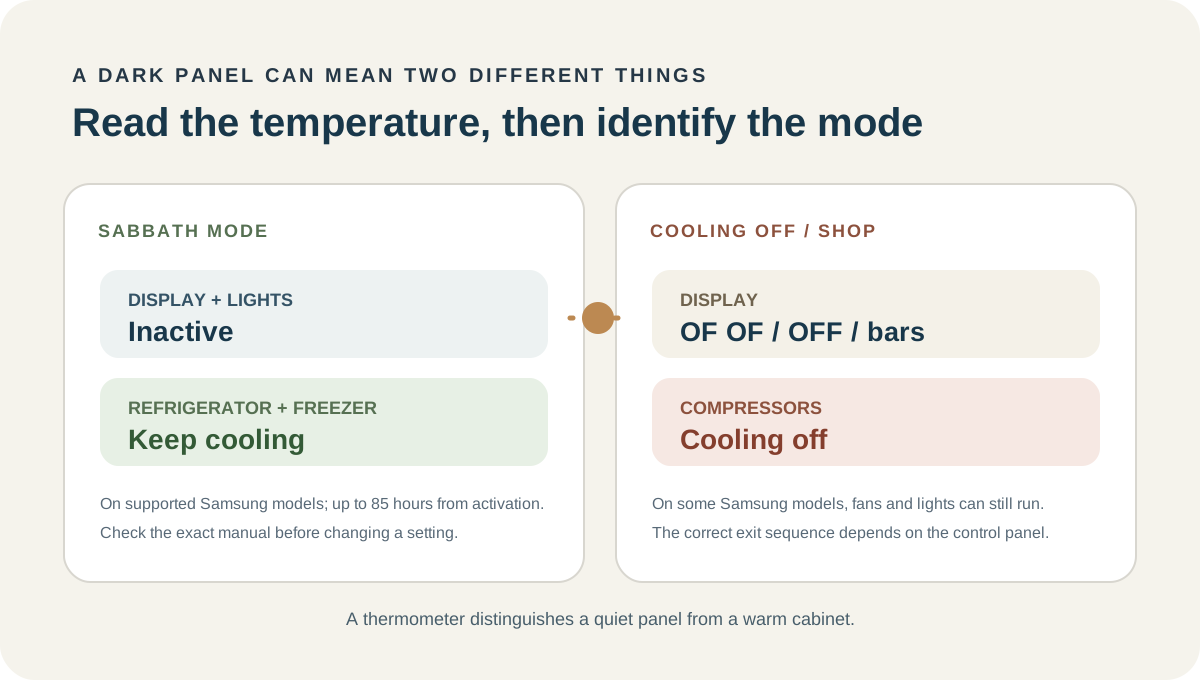
On supported Samsung refrigerators, Sabbath Mode can turn off the display, buttons, and interior lights while the refrigerator and freezer keep cooling. The mode can remain active through a power outage for up to 85 hours after it was enabled. So a dark panel alone does not mean cooling stopped. Check the actual compartment temperatures; if they are rising, Sabbath Mode does not explain the cooling loss by itself.
Start with a thermometer, not the blank panel
Check the refrigerator and freezer separately with an appliance thermometer. A setpoint is the target, not a live reading of every shelf. Keep refrigerated food at 40°F or below; a dark display cannot confirm that food is at a safe temperature.
Write down both readings and whether they are moving up or down. A cold freezer with a warm refrigerator is a different pattern from both compartments warming. The display may be quiet for a mode-related reason, but the measured temperatures tell you whether cooling is actually continuing.
If food has warmed during an actual outage, use the separate power-outage guide for the food-safety timeline. Keep the doors closed while you check.
What Sabbath Mode does—and does not do
Sabbath Mode is a control behavior, not a cooling-off setting. On Samsung refrigerators that support it, the buttons, display, and internal lights do not respond as usual, while the refrigerator and freezer continue cooling. The mode is not available on every model; if the exact model’s manual does not list it, do not assume the feature exists.
On supported models, Sabbath Mode stays active for 85 hours after activation, even if the refrigerator loses power and restarts. That can make an outage seem to have left the panel “dead” when the refrigerator is still operating. The timer is counted from activation, not from the moment power returns.
That behavior has a clear limit: Sabbath Mode can explain an inactive panel and lights, but it should not make the measured food temperature climb. If the temperature is rising, keep investigating the cooling symptom instead of treating the mode as the answer.
Separate a dark Sabbath panel from Cooling Off
These two states are easy to mix up because both can appear while someone is trying to understand a warm refrigerator. Their effects are different.
| What you observe | What it can mean | What it does not prove | Next step |
|---|---|---|---|
| Display, buttons, and interior lights are inactive, but temperatures remain steady or fall | Sabbath Mode may be active on a model that supports it | That the refrigerator has lost power or stopped cooling | Check the exact model’s manual and recheck both temperatures |
The panel shows OF OF, O FF, OFF OFF, or scrolling temperature bars |
Samsung Cooling Off / Shop mode may be active | That Sabbath Mode is on | Use the instructions for the exact control panel; exit steps vary |
| The display is dark and the refrigerator temperature is rising | A display state alone cannot identify the cooling fault | That Sabbath Mode caused the warming | Protect food, check the model’s documented mode, then use the general cooling path or contact support |
| The panel is dark after power returned, but food temperatures are still cold | Sabbath Mode may have remained active through the interruption | That the panel will stay dark permanently | Check the activation timeline and model instructions |
In Cooling Off mode, some Samsung refrigerators let the fan and lights operate normally while the compressors stay off, so neither compartment cools. A dark Sabbath display is the opposite clue: cooling is supposed to continue. Do not use a button sequence for one state to change the other.
The button sequence is not the diagnosis
Look at what changed just before the panel went dark. A Samsung RS27T5200SR kept running after its Lock and Door Alarm buttons were held together to silence a ding, but the interior lights and both control panels stopped responding. A brief 5–10-second breaker interruption and unplugging did not bring them back. That pattern is a reason to check the model's documented modes before assuming the cooling system stopped.
Another refrigerator can behave differently. On a Bosch KGN86AI32U, a beep was followed by a candle-and-pie icon; unplugging for 30 minutes, then 5 and 10 minutes, only brought the panel back for a moment. Holding that unit's mode buttons for 15 seconds cleared the icon. One Frigidaire Professional FPFU19F8WF2 account describes a different snag: a 5-second “−” and “F/C” hold did not register until the finger landed slightly beside the printed minus button, after 8–10 tries. That is a model-specific observation, not a general button recipe. Neither sequence applies to a Samsung. Match the complete model number first.
When the readings seem to change with the mode
Consider a less typical temperature sequence: an LG refrigerator read 50°F in the fresh-food section and 20°F in the freezer. The readings appeared to return to an acceptable range after Sabbath Mode was enabled, then rose again after it was turned off. A service visit later identified low refrigerant; after a refill, the warm readings returned nine days later in normal mode.
That sequence does not show that Sabbath Mode repairs a cooling system. It shows why a mode change and a temperature change should not be treated as proof of cause. Record the readings, note when the mode changed, and keep a temporary improvement separate from a confirmed repair.
Use only the exit method for your model
Samsung uses different button combinations across refrigerator models. Some models that support SmartThings also allow Sabbath Mode to be changed in the app. Neither option is universal. Match the complete model number to its manual before touching controls; do not copy a sequence from another Samsung series or another brand.
If the manual confirms that your model has Sabbath Mode, follow only its listed exit steps. If the display comes back but the temperature keeps rising, the mode was not the cooling diagnosis. Continue with the general refrigerator checks or request model-specific support. Do not remove a panel to reach a switch or control board.
When the blank display needs a different response
If both compartments are warming, a documented mode has been ruled out, or the display stays unresponsive beyond the model’s expected mode behavior, stop guessing at button combinations. Record the exact model, both thermometer readings, whether power was interrupted, and what the display did when power returned. Give those observations to the manufacturer or a qualified appliance technician.
If the refrigerator temperature is above 40°F, handle the food question separately while you arrange help. A lit or dark panel is not a food-safety measurement.
FAQ
Does Sabbath Mode make a Samsung refrigerator stop cooling?
No. On Samsung models that include it, the display, buttons, and interior lights become inactive while the refrigerator and freezer continue cooling.
Can Sabbath Mode stay on after a power outage?
On supported Samsung models, it can remain active when power returns. The documented duration is 85 hours from activation, even if an outage interrupts power.
Does every Samsung refrigerator have Sabbath Mode?
No. Check the exact model’s manual. If it does not mention Sabbath Mode, do not assume the refrigerator has it.
Is a dark panel the same as Cooling Off mode?
No. Samsung describes Cooling Off / Shop mode with indicators such as OF OF, O FF, OFF OFF, or scrolling bars. On some models, the fan and lights still work even though the compressors are off. A dark display can have a different explanation.
What if the refrigerator is still warm after I exit the mode?
Measure both compartments again. Sabbath Mode does not prove the cooling system is healthy or identify a failed part. If the temperature remains high or continues rising, follow the model-specific cooling guidance or contact support.