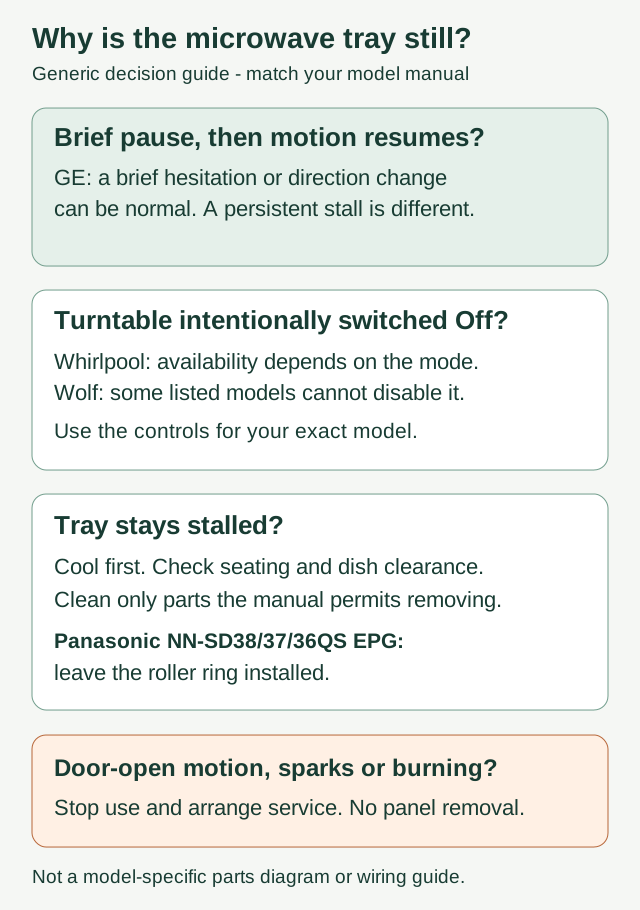
If your microwave turntable stays still during cooking, stop the cycle and check the Turntable setting, dish clearance and tray seating. Let the glass cool before cleaning. A brief pause or reversal can be normal on some GE models; a tray that remains stalled needs further attention. Do not remove a support until your model's manual says it is removable.
First, rule out abnormal operation
If the tray moves with the door open, the door is damaged, or you see sparks or smell burning, stop using the microwave and arrange service. Disconnect power if you can do so safely. Do not open the cabinet, remove a bottom panel or test the motor yourself: internal microwave components can retain dangerous voltage after unplugging.
One Panasonic NN-SC886S owner reported rotation with the door open. Unplugging and resetting did not resolve it; the owner eventually replaced the appliance. That account does not establish which component failed, or whether microwave energy was being generated. It does show why an abnormal door-open condition belongs in the service branch rather than the tray-cleaning branch.
Is it stopped, or only changing direction?
Watch through the closed door during an ordinary cooking cycle. A kitchen timer counts down without necessarily running the cooking system. If the larger problem is that food stays cold, follow the separate microwave not heating guide.
GE explains that its turntables can start in either direction and may reverse after cooking or defrosting is interrupted. A brief hesitation, jerk or pause can also be normal. This is different from a tray that never resumes, repeatedly catches the dish against the wall, or produces persistent grinding. Record that distinction before requesting a motor replacement.
Check whether your cooking mode permits Turntable Off
Look for a Turntable key or the matching control-menu instruction. Do not assume every microwave has this setting.
On the Whirlpool controls covered by its turntable guide, some models use a dedicated key; others use Tools, then Turntable. The ability to switch rotation off is restricted to supported manual functions. Preset, automatic and sensor cycles do not provide the same choice. If the control seems unavailable, check the selected program before concluding that the button has failed.
Wolf lists MW24, MWC24, MS24 and MC24 among models whose turntable cannot be disabled. Hunting for an Off setting on one of those models will not explain a stationary tray. Match the model number on the appliance to the owner's guide rather than borrowing another brand's button sequence.
Clean and reseat only the parts your manual allows
Stop the appliance, disconnect power and let the tray cool. Hot glass can break when exposed to cooler water. Use mild soap and a soft cloth on permitted removable pieces, dry them, and wipe accessible crumbs or spills from the cavity floor. Check your manual before putting the tray in a dishwasher.
For a conventional removable roller ring and center drive:
- Return the correct support to its intended position, with its wheels on their track.
- Seat the correct glass tray the right way up, engaging its molded center with the drive beneath it.
- Check for a cracked tray, visibly damaged wheels or a center fitting that will not engage. Do not force, glue or improvise a replacement part.
- Make sure the dish does not touch the cavity wall. Use lighter suitable cookware or a smaller, evenly distributed portion if the load is excessive.
Panasonic's North American troubleshooting guidance specifically includes excess weight and wall contact among the checks. A tray that moves with a lighter load but stalls with a heavy dish has a different pattern from one that never moves at all; neither observation alone proves a failed motor.
Panasonic EPG exception: leave the roller ring installed
The European EPG instructions for Panasonic NN-SD38QS, NN-SD37QS and NN-SD36QS say not to remove the roller ring. Clean the accessible support and cavity as directed instead of pulling it out because a generic cleaning guide shows a loose ring. These instructions also describe how to reinsert it if it was accidentally removed; that is not an instruction to remove it routinely.
This exception is specific to that manual family. A similar-looking model number or a Panasonic manual for another region is not enough to establish the same support design.
Recheck once, without forcing the tray
Reassemble all required parts before using the microwave. Do not run it empty or test it with the tray or support missing. If there are no abnormal-operation signs, use a suitable container of water for the check specified in your owner's guide, keeping the door closed. Stop if the tray remains stalled or catches again.
Intentional Turntable Off is a feature on some models. Unexplained failure is a different condition. Follow the model's instructions for any permitted stationary cooking; do not treat manually turning food every few seconds as a general repair for a stalled tray.
What a failed first attempt tells you
A clean tray or a new motor does not, by itself, confirm a repair. These three reported histories illustrate the limits:
- LG LMV1683ST, recurring noise: stopping and restarting initially quieted it. When the noise returned, cleaning a hard crumb from the roller area seemed to help, but a later update said the noise was back. The temporary improvement did not identify the underlying fault.
- GE JVM1750SM1SS, still not rotating: a replacement motor and checking the On/Off control did not restore motion. Further internal work was followed by a fan-control problem, with no confirmed fix reported. Replacing another part blindly was not a demonstrated solution.
- Samsung MS32J5133BT, stationary tray: an owner found no obstruction and checked the manual for an Off function without resolving the symptom. Paid repair later restored operation, reportedly without recurrence for about two years. The repair's cause was not specified, so this is not evidence that every similar Samsung needs a motor.
Give the technician the motion pattern
Provide the exact model number, cooking program, Turntable setting if fitted, whether the tray ever resumes moving, any wall contact or grinding, and what changed after cleaning or reducing the load. Mention previous repairs and whether their improvement lasted.
If the whole microwave stops partway through a cycle, use the separate mid-cycle shutdown guide. If cooking continues but the properly seated tray stays still, leave internal diagnosis to service. Motor, drive and control problems cannot be distinguished reliably from the symptom alone.
Official references
- GE: direction changes and brief turntable hesitation
- Whirlpool: model and cooking-mode limits for Turntable On/Off
- Wolf: models whose turntable cannot be disabled
- Panasonic: tray, load and clearance troubleshooting
- Panasonic NN-SD38/37/36QS EPG instructions, EN10 · copy of the manufacturer's accessory page
- Whirlpool: cooling and cleaning the glass tray