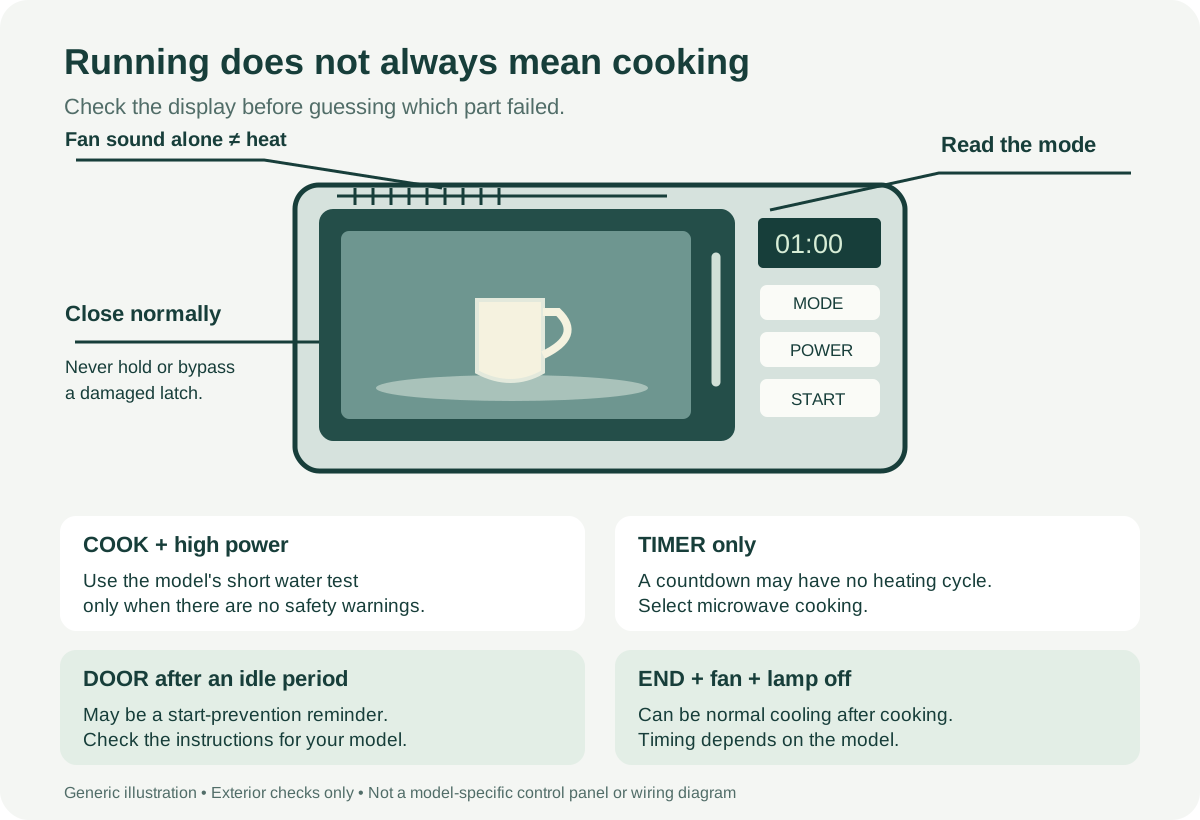
If your microwave runs but does not heat, check that you started a cooking cycle, clear Demo Mode, and confirm that the door closes normally. With no damage or unusual electrical symptoms, use the short water test below to separate no heat from uneven food heating. If the water stays cold after those checks, stop testing and arrange service. Lights, a spinning tray and a fan cannot prove that the heating system works.
Stop here if something looks or smells wrong
Do not run another test if the door is damaged, sparks appear, a new loud electrical buzz develops, or you smell burning from the appliance. Smoke, damaged wiring and repeated breaker trips also need professional attention.
Keep the outer cover fitted. A microwave can retain dangerous electrical charge after unplugging; disconnecting it does not make its internal parts safe to touch. Do not bypass a door switch or fuse.
Make sure the countdown means cooking
A kitchen timer can count down without heating anything. Cancel that timer, select ordinary microwave cooking and press Start as your model requires. A fan running nearby does not establish which function you selected.
A control lock is a separate check. If the display shows LOC, L or a lock symbol, use the unlock instructions for that exact panel. Do not try a button sequence from a different appliance.
A fast countdown can point to Demo Mode
Demo Mode can run the display, light and turntable without generating microwave heat. On Samsung models that offer it, an unusually fast countdown is a useful clue. Check the model's settings before treating the problem as a failed component.
Button sequences vary. If your Samsung model has no Demo Mode and the countdown is still abnormally fast, arrange service rather than assuming a hidden demonstration setting exists.
Check the door, then read its message
Remove shipping material and visible food residue that prevent normal closure. Check whether a dish or rack is in the way. Close the door normally; do not slam it, hold it under pressure or manipulate the latch to make the oven run.
A door message can also be a start-prevention reminder. On applicable Whirlpool over-the-range models, DOOR or OPEN/CLOSE DOOR appears after the door has remained closed for 5 minutes or more without starting. Open and close it, then start the selected cycle. Certain Whirlpool countertop controls use an idle period of about 1 minute instead. Match the behavior to your manual. A reminder that will not clear needs service.
Check the power setting before testing heat
Defrost, Soften and other gentle settings do not behave like full-power cooking. Select the model's ordinary high-power microwave mode for a heating check. A numbered power scale is model dependent: do not assume that the same number means the same output on every microwave.
Use a short water test, not an empty oven
For the applicable Whirlpool countertop models, heat 1 cup (250 mL) of water in a microwave-safe container for 1 minute at 100% power. Follow your own manual if it specifies a different test. Never run it empty, use a sealed container or extend the test to force boiling.
Handle it carefully: water may be hot without bubbling. Warming confirms some heat, not rated output or a healthy component. If it stays cold after the settings and door checks, book service.
If water warms but a meal has cold spots, check the portion size, power, cooking time and food arrangement. Stir or turn food as its cooking instructions require. A dense frozen centre and a completely cold cup of water are different observations.
Using a generator or power inverter?
A generator or power inverter may power a Whirlpool countertop microwave's controls and lights without supporting heating. A lit panel does not clear the supply.
Report backup-power use and have the supply checked against the appliance's requirements. Do not improvise adapters, alter wiring or move a built-in unit to test another outlet. This does not mean every generator is unsuitable.
A fan after END is not a new cooking cycle
On applicable Whirlpool countertop models with convection functions, a cooking period longer than 2 minutes can be followed by 3 minutes of cooling and convection-fan operation. The display shows END and the cavity lamp is off.
That combination can be normal cooling. It does not explain a cup that stayed cold during the cooking cycle itself. Check what the display said when the food was supposed to be heating.
Some programmed pauses are intentional
On applicable Whirlpool combination models, Keep Warm uses a 15-minute cycle with microwave heating for 1.5 minutes, followed by a period with the cavity lamp and fan off while the countdown continues.
Do not use that pause to diagnose a failed heater. To investigate a no-heat complaint, leave the warming program and use the model's ordinary cooking check. These timings are not specifications for every Whirlpool microwave.
Tell service if heating changed with the vent fan
An individual Samsung ME11A7510DS repair account described heating that depended on the range-hood fan being on; the owner reported that Samsung replaced the noise-control board. Another Samsung over-the-range owner described unsuccessful magnetron and main-board replacements before a fuse-board replacement restored heat. The fault later returned, and the fan setting again changed the result. That second owner's exact model was not established.
These are reported experiences, not a diagnosis for your appliance. If you have already observed this pattern, include it in the service request. Do not keep a malfunctioning microwave in use by treating the vent fan as a workaround, and do not open the board compartment.
Quieter after a repair does not mean it heats
For a Whirlpool WMH31017HS0, a replacement magnetron reportedly removed the loud buzzing but left the food cold. Further checks followed; the account did not establish a completed repair.
Sound improvement and heating restoration should be reported separately. A normal-sounding fan or a newly installed part cannot substitute for checking whether the original heating failure was resolved.
A replacement part is not a confirmed diagnosis
Repair histories can disagree. An LG LMC2075BD owner reported that replacing the magnetron did not restore heating and ultimately obtained a warranty replacement. Another participant in the same-model discussion reported restored operation after a magnetron change. Neither outcome tells you which part your unit needs.
A KitchenAid repair account described replacing a damaged magnetron and inverter, then the main board, without clearing the fault. The customer chose a countertop replacement. The exact model and error text were not established, so there is no code or parts recommendation to transfer to another appliance.
These examples illustrate the limits of guessing from symptoms. They are not a replacement schedule or a claim that a particular brand cannot be repaired.
Make the service request about what actually happened
Send the model number, selected cooking mode, any exact display message and the water-test result if it was safe to perform. Add whether the failure began on backup power and whether the fan was running during cooking or only after END. For an earlier repair, list what changed and whether heating returned at any point.
Ask the technician to demonstrate the affected cooking function before closing the job. That gives the follow-up visit a concrete outcome to check.
Official references
- Samsung: no-heat controls and Demo Mode
- Whirlpool: countertop power supply and heating test
- Whirlpool: over-the-range door reminders
- Whirlpool: countertop start prevention and cooling behavior
- Whirlpool: model-dependent cooking and warming functions
- LG: heating performance and food checks
- Midea: external checks and internal-repair boundaries
The model-specific behaviors above do not apply to every microwave bearing the same brand. Use the operating instructions for your appliance.