If your dishwasher will not start, check the door latch, Control Lock and Delay Start before trying a reset. Use the start-and-close sequence in your model's manual. A lit panel does not identify a failed part, and holding Start can cancel a cycle on some machines.
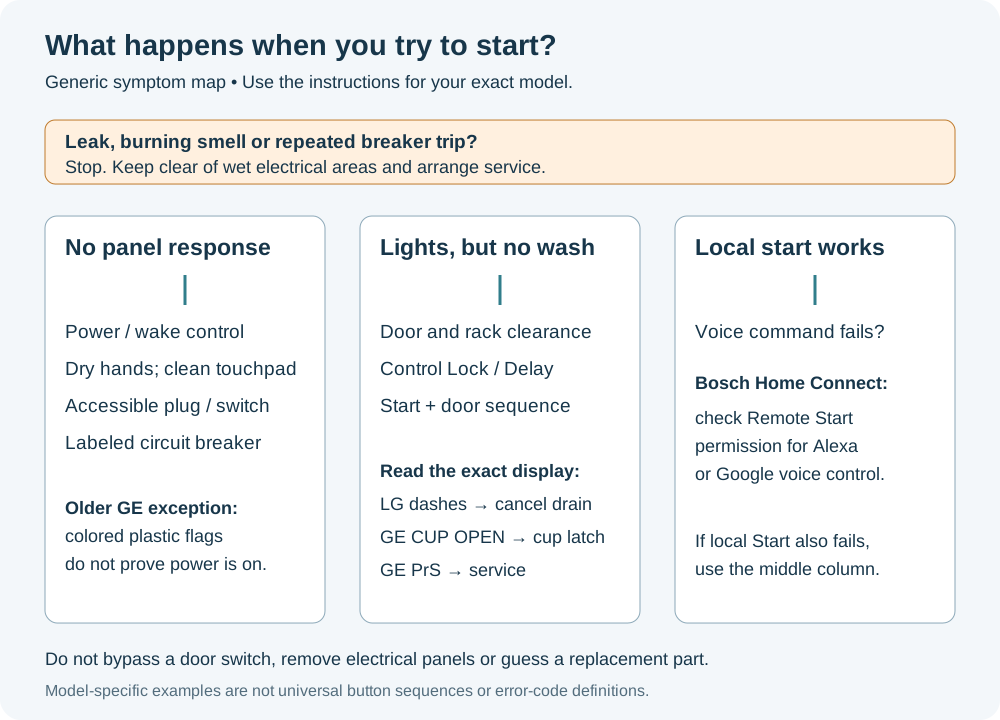
Stop if you notice a burning smell, damaged wiring, leaking water or a breaker that trips again. Keep clear of wet electrical areas and arrange service. The checks below stay outside the dishwasher's electrical compartments.
Is the panel actually responding?
Press Power if your dishwasher has that button. On Samsung touch controls, wet or soapy hands can prevent a press from registering. Dry your hands; if the Power button is dirty, clean it with a soft, damp cloth. Do not spray cleaner into the panel.
A sleeping display may wake when you open and close the door. If it remains completely dead, check an accessible plug and the dishwasher's wall switch, if fitted. Check the labeled circuit breaker without removing any electrical covers. For a newly installed machine that has never powered up, contact the installer.
Older GE dishwashers have an unusual exception: some colored indicators above the cycle buttons are plastic flags, not electric lights. They can remain visible without power. If those flags are your only evidence that the machine is on, return to the external power checks rather than assuming the control board has electricity.
Close the door without forcing it
Pull the racks out far enough to check for a pan handle, utensil or dish projecting beyond the rack. Push the racks fully home. If you recently removed the lower rack, check its orientation against the manual; a reversed rack can prevent closure on some machines.
Close the door normally. If it will not latch, or it only starts while you lift or press against the door, stop using that workaround and have the door alignment and latch checked. Do not insert anything into the door switch or hold it closed with a shim.
One GE GDT655SSJ0SS owner could select controls but could not start a cycle. Canceling, checking the lock and resetting the breaker did not resolve it; a technician's latch replacement did. That is a reason to report the door behavior during a service visit, not proof that every illuminated dishwasher needs a latch.
Read the display before changing settings
Lock symbol or LG CL
Control Lock can leave the panel illuminated while preventing normal button operation. Use the unlock instruction printed on your panel or in its manual; the button and hold time vary.
On LG models covered by the DIOS panel guidance, CL means the controls are locked, and turning Power off does not clear that setting. The documented Half Load + Energy Saver combination is held for three seconds. Use it only if your model's instructions specify that combination; other LG panels use different buttons.
A delay indicator or hours remaining
A selected delay means the dishwasher is waiting to start. On GE models using the number-plus-H display, 1H indicates Delay Start. Cancel the delay using your model's instructions, then select the wash you want.
Do not assume that opening the door cancels a GE delay. Avoid trying random long button presses: the same Start key may also be a Cancel control.
LG dashes after holding Start
On LG dishwashers with the documented press-and-hold Cancel function, holding Start for three seconds cancels the wash, drains the tub and shuts the dishwasher off. Dashes can appear while cancellation is in progress.
Wait for that cancellation to finish. For your next attempt, use the normal brief Start press and door sequence specified for the model. If every attempt involves holding Start down, you may be canceling the wash you meant to begin.
GE CUP OPEN
On GE models that display CUP OPEN, the detergent cup has not been closed. Add the appropriate detergent and latch the cup before starting. If the message persists despite a properly closed cup, arrange service.
This is different from finding a closed dispenser after a completed wash. For that later-cycle problem, use the detergent dispenser guide.
GE PrS
PrS indicates that the pressure sensor is sending an invalid signal to the control. On models using this code, the cycle may refuse to start or may cancel.
Record the exact code and arrange service. It is not a Control Lock message, and the display alone does not tell you to buy a sensor: its wiring connection is also among the possibilities that need diagnosis.
Match Start/Resume to the door sequence
For top-control Maytag models covered by manual W10599489 Rev C, press Start/Resume and close the door within four seconds. If the door is left open too long, repeat the start step. The same manual distinguishes front-control models, where you close the door before pressing Start/Resume.
That four-second limit is not a universal dishwasher rule. Frigidaire's startup guidance says to close the door immediately after Start/Cancel; your own manual supplies the applicable sequence. After opening a door during a wash, you may also need to press Resume before closing it.
If the main symptom is a repeating door warning or a flashing light pattern, see dishwasher beeping and interrupted cycles.
A display model may still be in Demo mode
If this is a newly installed or former showroom GE dishwasher whose controls operate without a wash starting, check whether Demo mode is enabled. The exit sequence differs among GE model families. Use the model's instructions or ask the installer to check it.
Do not copy a button combination from another GE machine merely because the controls look similar.
Does it start at the machine but ignore a voice command?
For a Bosch dishwasher with Home Connect, test the normal local start sequence first. If that works but an Alexa or Google voice command does not, check Remote Start permission.
Bosch requires Remote Start to be activated for those voice commands to start the dishwasher. Follow the model's Home Connect instructions to enable it. This branch applies to connected models and voice control; a dishwasher that also refuses a local Start still needs the door, settings and error checks above.
It makes a noise, but no wash follows
If the machine begins a sequence but never fills, check that its accessible water-supply valve is open, particularly after plumbing work. Do not loosen a hose to test it.
Draining and washing are different stages. If water remains in the tub and the machine cannot move beyond drainage, follow the dishwasher not draining guide. If it fills and completes a cycle but leaves food behind, use dishwasher not cleaning dishes. Neither problem is solved by repeating the startup sequence indefinitely.
When one reset helps only temporarily
If there is no leak, burning smell or electrical warning, try the reset specified in the manual once. For example, Whirlpool's general reset guidance describes disconnecting power for one minute; use the accessible plug or correctly identified breaker, without moving the machine or opening a panel.
Watch what happens on the next normal start. A temporary recovery does not identify the defective component. In another GE owner's experience, replacing a latch had not helped, a power outage briefly restored operation, and later breaker resets failed. Similar symptoms can have different causes.
For service, give the model number from the rating label, the exact display or flash pattern, whether you can change cycles, and whether the machine fills, drains or stays silent. Include any recent installation or plumbing work and how long a reset helped. Leave latch-switch testing, wiring, fuses and control-board diagnosis to a qualified technician.