If your washing machine door is locked, pause or cancel the cycle using its normal controls, wait for the drum to stop, and check for hot water or water left inside. Do not force the handle. A locked door can also belong to an active post-wash feature, an unavailable Add Item request, or a new washer's installation sequence.
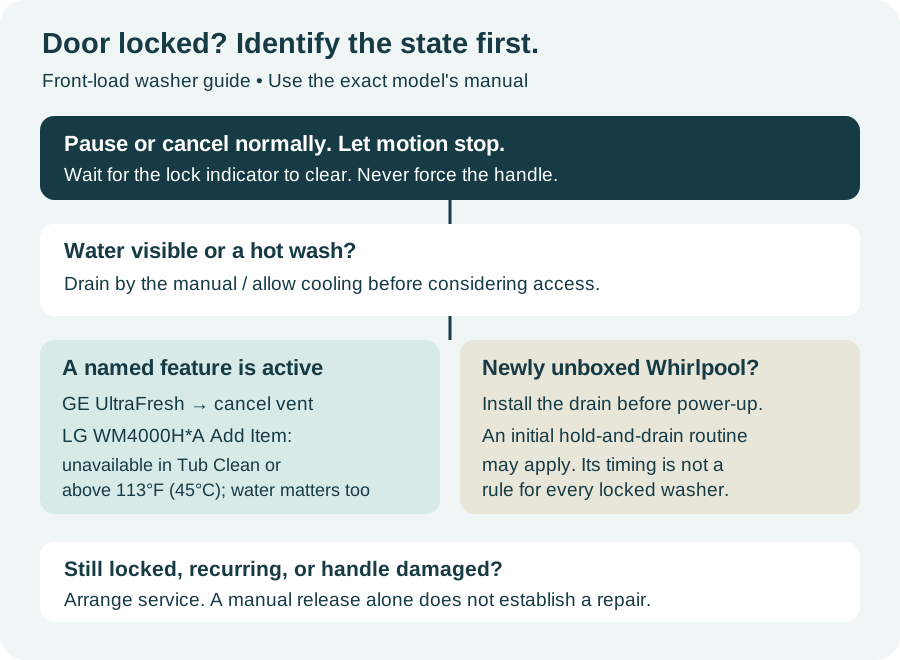
This guide concentrates on household front-load washers. Top-load lid locks and all-in-one washer-dryers have different controls; use their own manuals. Match the feature and model before borrowing a button sequence.
Just finished or paused? Give the lock time to release
A stopped drum does not necessarily mean the door has released. Use the door-lock indicator and the waiting period in your manual. Try the handle gently only after the washer signals that it is safe to open.
Do not keep pressing Start, changing programs or pulling the handle while waiting. Those actions make it harder to tell whether the original cycle has ended or another one has begun.
After a hot wash, wait for cooling
Hot water can keep a front-loader locked even after motion stops. Keep the door closed and allow cooling. LG's front-load recovery guidance says this can take up to about 20 minutes, depending on conditions.
That is a cooling estimate for the covered machines, not a deadline after which a door should be forced. If the washer remains locked after the model's normal recovery procedure, contact support.
Water remains? Deal with drainage first
Use the model's drain command if the controls respond. If it cannot empty, follow the washing machine not draining guide and your manual's owner-accessible emergency-drain instructions.
Disconnect power and let the water cool before opening an owner-accessible drain/filter compartment. Collect water as the manual directs. Do not unscrew a filter cap abruptly or assume that every washer has the same small drain hose.
An empty-looking drum does not prove that the machine's water-level signal has cleared. A recurring Whirlpool long-drain code belongs in the F9 E1 guide, rather than another attempt to pull the door open.
Check which lock the display means
Control Lock and the physical door lock serve different purposes. A control lock can stop button presses from working; a door lock prevents access to the drum. Clearing one does not establish that the other has released.
There are model-specific connections between them. On some Samsung front-load washers, Child Lock also keeps the door locked. Use the Child Lock instructions for the exact model, then check the remaining cycle, heat and water conditions. Do not assume that holding any two buttons will work.
GE UltraFresh: is the vent system still running?
On front-load GE washers equipped with UltraFresh Vent, the door stays locked during the ventilation operation and the basket turns slowly at intervals. The process can run for up to eight hours.
If that named feature is active, GE lists three ways to cancel it: press Power, turn the cycle dial, or press the UltraFresh Vent pad. Wait for the lock to release before opening.
UltraFresh ventilation is intended to run after the clothes have been removed. If laundry is detected, a different feature such as Tumble Care or 1 Step Wash + Dry may operate, depending on the model. Identify the displayed mode rather than treating every locked GE door as an eight-hour vent cycle.
Some other machines also keep the door locked during post-wash care. For models covered by Whirlpool's Fresh Hold guidance, Cancel ends that feature and permits unlocking. Check that your washer actually offers it.
LG WM4000H*A: Add Item can be unavailable by design
On the WM4000H*A family, Add Item pauses a running wash and can release the door only after movement stops and the water level and temperature are safe.
There are two explicit limits in its manual:
- Above 113°F (45°C) inside the drum, the washer gives a short warning chime and does not allow Add Item.
- During Tub Clean, Add Item is disabled.
Excessive water level also prevents opening. A rejected Add Item request under one of these conditions is not, by itself, evidence that the lock has failed. Let the current program reach a safe state or follow the manual's cancellation procedure. Repeated resets are not a way around those restrictions.
Brand-new Whirlpool washer locked before its first load?
A newly unboxed Whirlpool front-loader may arrive with the door locked. This is a separate situation from a used washer that has trapped clothes after a wash.
Follow the installation instructions, including connecting the drain hose to the drain or a suitable collection container before initial power-up. Residual water may be pumped out. Whirlpool describes several possible responses: immediate unlocking, a door-lock light that flashes for about 60 seconds, or an approximately eight-minute hold-and-drain routine without spinning.
Allow the applicable installation sequence to finish when there is no leak or other hazard. If the door stays locked, contact support. Do not apply that eight-minute timing to an unrelated fault on an older washer.
Blank panel or interrupted cycle: what did the reset actually change?
For a blank panel, check the accessible plug and household supply without opening electrical fittings. Stop for a damaged outlet, burning smell, repeated breaker trip or water near electrical connections. Electrical repairs belong to a qualified professional.
Once heat, water and an active operating mode have been considered, use one reset specified by the model's instructions. Two reported histories illustrate why the result matters:
| Reported washer or condition | What failed first | What happened next |
|---|---|---|
| Whirlpool WFW560CHW, blank panel and locked door | Unplugging and a breaker reset did not restore operation | The owner later reported that fixing the outlet resolved the problem |
| Maytag front-loader after interrupting the wrong cycle; exact model uncertain | A quick unplug and reconnect did not release the door | The owner reported that a longer power interruption opened it |
These are individual outcomes. They do not establish a universal reset duration or show that another washer needs an outlet repair.
Emergency release is not the same on every machine
Use an emergency door release only if the owner's manual describes it as an owner procedure, and only after meeting its requirements for stopped motion, cool water, drainage and disconnected power.
If the instructions require cabinet removal, reaching behind the lock, moving a stacked dryer or working near wiring, arrange service. Do not substitute string, a card or a screwdriver for the documented release. Opening the door by hand would retrieve the laundry; it would not prove that the original fault was repaired.
If it keeps locking, ask for more than another reset
A GE GFW550SSNWW owner described earlier relief after draining and resetting, followed by a recurrence that further power interruptions did not clear. The reported next step was a technician, with no final repair confirmed.
Another owner, with a Maytag front-loader whose exact model was not supplied, reported continuous pump noise and a flashing lock. A five-minute power interruption failed. A technician later opened it, found the filter clear and ran a test; the machine reportedly seemed OK then, but a lasting fix was not established.
For a recurring problem, give service the model, displayed mode or code, whether water was visible, and exactly which attempt changed the behavior. Mention a loose or damaged handle. Ask whether the visit will address both access to the laundry and the cause of the lock remaining engaged.