If your Samsung dryer runs but stays cold, check whether Eco Dry is active and whether the selected cycle should heat. Then read any vent-test message in context: C1/CL1 or Ct can mean the test conditions are wrong, rather than that a blockage has been found. A passing vent test with persistent no heat still calls for service.
This guide covers US vented electric and gas Samsung dryers. Heat-pump, ventless and washer-dryer combination models need their own instructions. Test availability and controls vary.
Stop using a dryer that smells burned or repeatedly trips a breaker. Leave cabinet opening, electrical measurements and gas work to a qualified professional. Do not bypass a thermal safety device or operate a gas dryer with its exhaust disconnected.
Check what “not heating” describes
Eco Dry can start a cycle without heat. On models with that option, check it each time: it may turn on automatically for a commonly used cycle. Samsung's initial heat check uses Time Dry with Eco Dry off, then checks for warmth after 30 seconds.
Warm but damp clothes, a sensor cycle ending early and a heated cycle staying cold are different observations. Record which one happens. A new installation that has never heated deserves an installation review before a parts diagnosis; use the installer for supply and connection checks.
Was the vent test valid?
Run a supported test with the drum cool and empty and the door closed, using your model's instructions. Do not open the door while the test runs.
| Result during the test | What it tells you to check |
|---|---|
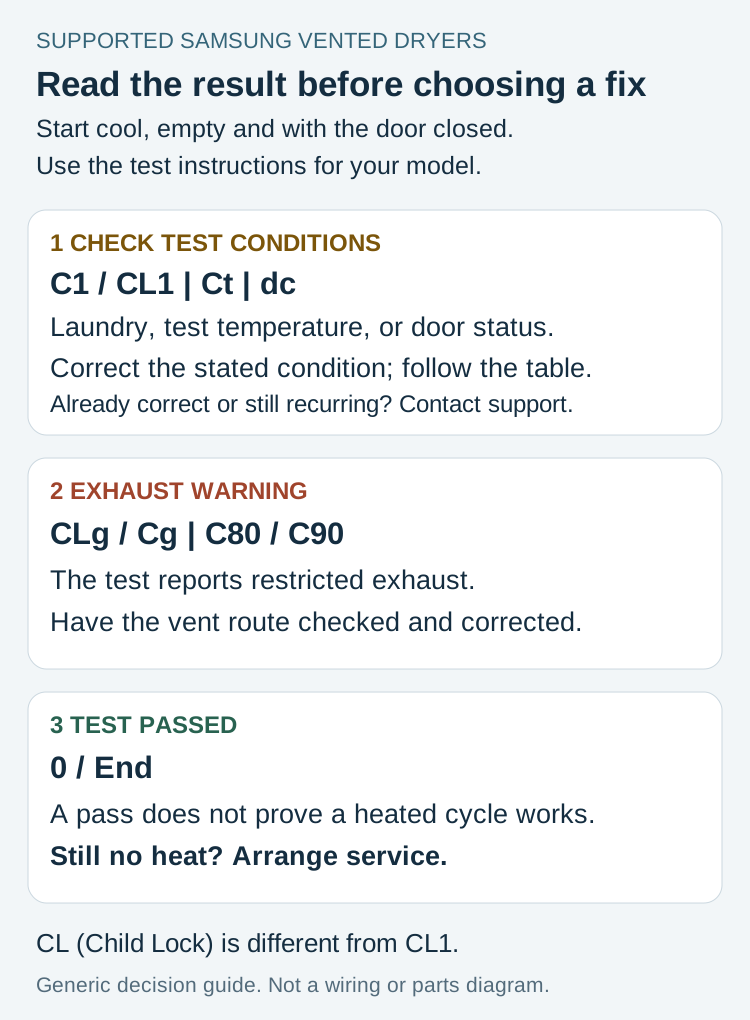
| C1 / CL1 | Laundry was detected. Empty the drum before retrying; if it was already empty, request service. |
| Ct | The dryer is below freezing or above 104 F. Let it sit at room temperature for one hour before retrying; a persistent Ct needs service. |
| dc | Close the door before retrying. |
| CLg / Cg / C80 / C90 | The test reports restricted exhaust. Have the vent route checked and corrected. |
| 0 / End | The test passed. If a heated cycle still produces no heat, arrange service. |
CL without the final 1 is Child Lock, not the CL1 laundry-detection result. Use the Child Lock instructions for your model if that is what the display shows.
A test-condition message does not establish that the vent is clear or blocked. If it persists after the stated condition is corrected, contact support. Keep a photo of the exact display rather than reporting every result as “a clog code.”
One model-specific exception to generic button instructions: for DVE(G)60A9900*, the documented route is to hold Options for three seconds, select Vent Blockage Test with the Navigation dial and tap OK. That starts the test immediately. Do not apply this menu route to a different control panel.
HC is a reason to investigate, not a shopping list
HC, hE, HC4 and 1HC are heating-related messages. Trapped heat from a dirty lint screen or restricted exhaust is one possible explanation; Samsung also describes low voltage producing weak heat on electric models. The message alone cannot choose between those conditions or identify a failed part.
Clean the accessible lint screen as directed in the manual. Have an inaccessible vent or uncertain electrical supply checked professionally. If the message returns after the permitted checks, arrange service instead of replacing another fuse on the strength of the code.
When the first improvement did not last
The following owners reported different sequences. Their accounts document what changed, not a repair prescription for your machine. None confirms a final successful repair.
DVE50BG8300VA3 — the warning cleared, then the original fault returned. An owner saw HC despite vent cleaning. After a reported fuse replacement, a vent test showed C80. After more cleaning, the owner reported no vent-test error and bedding initially warmed. Later in that same load, the drum was cold, the bedding remained damp and HC returned. That result had not established a lasting recovery.
DV42H5000EW/A3 — the symptom changed after work. Vent and filter checks did not resolve cold tumbling. After the heating assembly was replaced, starting the dryer produced dE. Checking the door and resetting did not clear it. dE is a door-related message. A new dE after work changes the immediate question: the dryer must be able to start before its heat can be assessed. Report the new message to the repairer; this account does not establish its cause or whether the original heat problem was fixed.
DV218AEB — a short run and the next start gave different results. Replacing a reported cut-off restored heat briefly, but the following start was cold. A further high-limit thermostat replacement was followed by another relapse. That sequence supports reporting both starts to a technician; it does not identify a universal faulty component.
DVE45T6000W/A3 — the timing stayed repeatable without a letter code. On a one-hour heated Timed Dry cycle, an owner reported heat stopping as the display reached 59 minutes. Cleaning, a thermistor replacement and a control-board replacement had not resolved it. Restarting repeated the short warm interval. Another part was ordered, but a completed repair was not reported.
If a repair has already been attempted, tell the service provider whether warmth lasted for a short test, part of a load or a complete load, and whether the displayed message changed. Keep attempted work separate from confirmed results.
What to do with a clear test and a cold dryer
Do not use a clear vent-test result as a certificate that the heating system works. Samsung's no-heat guidance directs you to service when the vent test passes and the dryer still does not heat.
For general gas-versus-electric and airflow distinctions, see the dryer running but not heating guide. For a callback, send the model number, fuel type, cycle and option settings, original display photo and the order in which symptoms changed. Leave further internal diagnosis to the technician.